ANDROID TUTORIAL
You want to install our service with Android Box or android phones ?
We can help you with a detailed step by step tutorial
All you have to do is follow this step by step tutorial !
And in case you struggle we can help all you have to do is contact support and we will help you set up the service !
How to Install on Android ?
Install IPTV Smarters on Android
1. Open This Link In A Web Brower On Your Android Box : Www.Iptvsmarters.Com
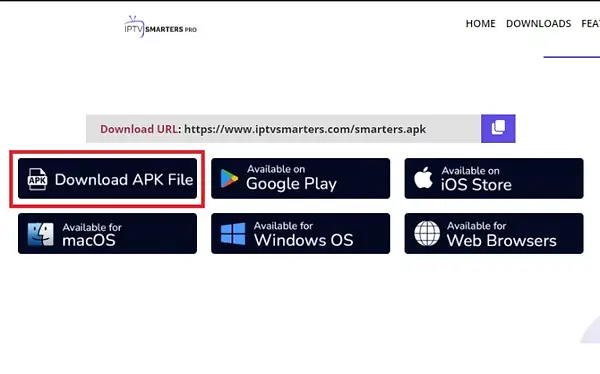
2. Click On Downloads
3. Click On Download APK File And Wait For The App File To Be Downloaded
4. Once Downloaded, Install The Application By Opening The APK File Download
( Usually The APK Opens Automatically And Offers You To Install The Application,
For Some Devices You Will Need To Install A File Explorer To Open The Downloaded File, We Suggest X-Plore File Manager )
5. Now You Have The App Installed, Open It And Click On ADD USER.
6. Choose To Login With X-Tream Codes API
7. Now You Can Enter The Credentials Provided By Our Team